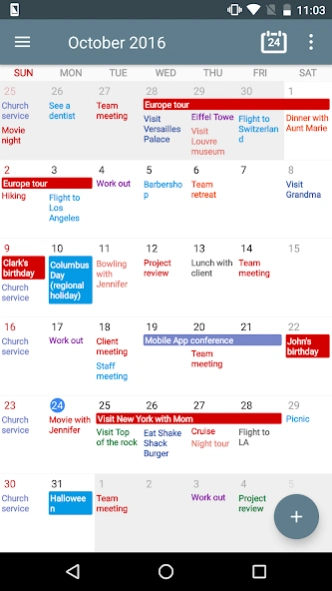
About Calendar+ Schedule Planner
Calendar+ is an easy to use professional schedule planner that helps manage business events and personal appointments in one app. Customize your schedule in one app. Calendar+ syncs with Google calendar, Outlook Calendar,...
Calendar+ is an easy to use professional schedule planner that helps manage business events and personal appointments in one app.
Customize your schedule in one app. Calendar+ syncs with Google calendar, Outlook Calendar, Exchange etc. automatically and gives you a perfect overview of your events. Calendar+ provides you with personalized views and highly customizable options to suit your need.
Calendar+ also provides beautiful home widgets. Be a productivity ninja and never miss important events or appointments again with Calendar+.
CALENDAR+ FEATURES:
CALENDAR PLANNING APP FOR EXPERT SCHEDULING
▪ Modern and sleek user interface for 6 views including day view, week view, month view, custom view, agenda view and year view.
▪ User tailored custom view from 2 days to 4 weeks.
▪ Intuitive user interface to add a new event.
▪ Copy, cut, and paste action support for existing events.
▪ Provides popup view for event overview and planning.
▪ Event title auto completion.
▪ Event search support.
▪ Easy and intuitive event invitation.
▪ Support for default notifications for all-day and timed events.
▪ Support for recurrent rules.
▪ Quick add support to add new events on the go.
▪ Seamless synchronization with Google calendar, Outlook etc. using the Android calendar synchronization.
▪ Home time zone support for traveling.
EVENTS WITH PERFECT OVERVIEW
▪ Beautiful event presentation with highly customizable word-wrapping options and user tailored view options.
▪ Supports a variety of event drawing options for views and widgets including event text color, word-wrapping and various drawing options.
▪ Support for light, dark and system default themes.
▪ Provides 50+ free themes for week and month widgets.
▪ Provides various widget sizes for different use cases.
APPOINTMENT REMINDER AND SCHEDULE NOTIFICATION
▪ Sends notifications with a pop-up, sound and vibration so you'll never miss your appointments.
▪ Supports default notifications for new events
▪ Supports default snooze delay.
▪ Provides intuitive snooze delay popup to set the delay when the notification goes off.
POWERFUL HOME WIDGETS
▪ Provides week, month, agenda, and today calendar widgets for your phone or tablet's home screen.
▪ Professional home calendar widget features with 50+ free themes, color combinations, tap action and more.
▪ Provides perfect event overview with word-wrapping, a variety of event drawing options and color combinations.
▪ Easy and intuitive event popup view by tap action
▪ Modern and sleek widget design including premium only themes.
PROFESSIONAL BUSINESS AND OFFICE CALENDAR
▪ Calendar+ is perfect for a business calendar, personal calendar or office event scheduling planner.
▪ Calendar+ even supports external event editing for professional users familiar with other calendar apps.
▪ Calendar+ provides various kinds of widgets compatible with other calendar apps and launchers.
Premium Features
▪ No ads
▪ Custom on time snooze delay
▪ Advanced drawing options including allday event text color, timed-event text color, event drawing shape, and more.
▪. Professional widget themes such as Modern, Darkness, and Translucent.
▪. Professional widget options such as weekend filtering, multi-week highlight, tap actions and more.
Previous Versions
Here you can find the changelog of Calendar+ Schedule Planner since it was posted on our website on 2019-10-25 12:08:08.
The latest version is 1.10.23 and it was updated on 2026-10-10 19:07:22. See below the changes in each version.
Calendar+ Schedule Planner version 1.10.23
Updated At: 2026-10-01
Changes: 1.10.23
New displayed period option for widgets
1.10.21
Alternate calendar support
1.10.19
New calendar grouping option
1.10.18
Major update with new day/week view
1.10.13
Photos attached in older versions may no longer appear. In the event edit screen, tap the placeholder to attach them again
1.09.57
New event sort options
1.09.55
Major update with calendar priorities and more
1.08.85
Major update with new widget presets
Calendar+ Schedule Planner version 1.10.22
Updated At: 2026-09-22
Changes: 1.10.22
Minor adjustments
1.10.21
Alternate calendar support
1.10.19
New calendar grouping option
1.10.18
Major update with new day/week view
1.10.13
Photos attached in older versions may no longer appear. In the event edit screen, tap the placeholder to attach them again
1.09.57
New event sort options
1.09.55
Major update with calendar priorities and more
1.08.85
Major update with new widget presets
Calendar+ Schedule Planner version 1.10.21
Updated At: 2026-09-16
Changes: 1.10.21
Alternate calendar support
1.10.19
New calendar grouping option
1.10.18
Major update with new day/week view
1.10.13
Photo attachments now use the Android system photo picker, so storage permission is no longer required
Photos attached in older versions may no longer appear. In the event edit screen, tap the placeholder to attach them again
1.09.57
New event sort options
1.09.55
Major update with calendar priorities and more
1.08.85
Major update with new widget presets
Calendar+ Schedule Planner version 1.10.19
Updated At: 2026-08-18
Changes: 1.10.19
New calendar grouping option
1.10.18
Major update with new day/week view
1.10.13
Photo attachments now use the Android system photo picker, so storage permission is no longer required
Photos attached in older versions may no longer appear. In the event edit screen, tap the placeholder to attach them again
1.09.59
Custom first day of week option
1.09.57
New event sort options
1.09.55
Major update with calendar priorities and more
1.08.85
Major update with new widget presets
Calendar+ Schedule Planner version 1.10.18
Updated At: 2026-08-06
Changes: 1.10.18
Major update with new day/week view
1.10.13
Photo attachments now use the Android system photo picker, so storage permission is no longer required
Photos attached in older versions may no longer appear. In the event edit screen, tap the placeholder to attach them again
1.09.59
Custom first day of week option
1.09.57
New event sort options
1.09.55
Major update with calendar priorities and more
1.08.85
Major update with new widget presets
Calendar+ Schedule Planner version 1.10.11
Updated At: 2026-07-22
Changes: 1.10.11
Photo attachments now use the Android system photo picker, so storage permission is no longer required
Photos attached in older versions may no longer appear. In the event edit screen, tap the placeholder to attach them again
1.09.64
Custom background for translucent widget themes and more
1.09.59
Custom first day of week option
1.09.57
New event sort options
1.09.55
Major update with calendar priorities and more
1.08.85
Major update with new widget presets
Calendar+ Schedule Planner version 1.10.08
Updated At: 2025-07-11
Changes: 1.10.08
Regular update and bug fixes
1.10.01
Hot fix for event edit screen
1.10.00
New widget settings and bug fixes
1.09.89
Widget wizard and more
1.09.79
New "copy to..." function and more
1.09.69
Holiday filtering and more
1.09.64
Custom background for translucent widget themes and more
1.09.59
Custom first day of week option
1.09.57
New event sort options
1.09.55
Major update with calendar priorities and more
1.08.85
Major update with new widget presets
Calendar+ Schedule Planner version 1.10.06
Updated At: 2025-06-21
Changes: 1.10.05
Regular update and hot fixes
1.10.01
Hot fix for event edit screen
1.10.00
New widget settings and bug fixes
1.09.89
Widget wizard and more
1.09.79
New "copy to..." function and more
1.09.69
Holiday filtering and more
1.09.64
Custom background for translucent widget themes and more
1.09.59
Custom first day of week option
1.09.57
New event sort options
1.09.55
Major update with calendar priorities and more
1.08.85
Major update with new widget presets
Calendar+ Schedule Planner version 1.10.02
Updated At: 2025-05-30
Changes: 1.10.02
New settings wizard
1.10.01
Hot fix for event edit screen
1.10.00
New widget settings and bug fixes
1.09.89
Widget wizard and more
1.09.79
New "copy to..." function and more
1.09.69
Holiday filtering and more
1.09.64
Custom background for translucent widget themes and more
1.09.59
Custom first day of week option
1.09.57
New event sort options
1.09.55
Major update with calendar priorities and more
1.08.85
Major update with new widget presets
Calendar+ Schedule Planner version 1.10.01
Updated At: 2025-05-19
Changes: 1.10.01
Hot fix for event edit screen
1.10.00
New widget settings and bug fixes
1.09.89
Widget wizard and more
1.09.79
New "copy to..." function and more
1.09.69
Holiday filtering and more
1.09.64
Custom background for translucent widget themes and more
1.09.59
Custom first day of week option
1.09.57
New event sort options
1.09.55
Major update with calendar priorities and more
1.08.94
Major update with new day/week widget
1.08.85
Major update with new widget presets